

Thematic Analysis of Open-Ended Survey Responses
Survey coding, Open-ended responses, Thematic analysis
Two tasters described Coffee A as “bright.” Should those answers count as mentions of acidity? For this tasting brief, we wanted to count explicit descriptions of acidity and keep ambiguous wording for discussion. Giving DataForest that distinction changed the count from ten to eight and left the other 58 responses’ labels intact.
In a spreadsheet, you would read each note, mark its themes, then revisit every row containing “bright” when the team settles the definition. You can delegate that second pass to DataForest. Ask for the changed IDs alongside the new counts so you can review the decision in context.
Define the themes for your open-ended survey responses
Our question was “Which attributes did people explicitly describe in Coffee A, and which comments should the tasting team read before writing its brief?” We used the first 60 nonempty Coffee A notes in source order. The public file contained 4,042 survey records, including 2,578 usable Coffee A notes. Each selected response received a local ID, A-001 through A-060. These 60 notes illustrate how to code comments. They cannot establish how common a preference was among all tasters. Great American Coffee Taste Test data and field definitions
In DataForest Desktop, open New task, choose a project and attach coffee-a-notes.csv with Select files or folders. Your own file can be as simple as two columns, response_id and note. One response may mention several attributes. Repeating “lemon” and “citrus” within a response should still count once under Fruit.
Prepare a tasting brief from the attached notes. Keep one row per response ID and preserve the original wording. Use these themes: Fruit, Sweetness, Acidity, Bitterness, Texture, Nut/Earth and Cocoa/Roast. Assign every theme the words support and quote the evidence for each. Keep untagged rows and flag uncertain wording with a reason. Export a review CSV and a second CSV counting distinct response IDs per theme.
Define each label in a sentence when you send the brief. In this example, Fruit covers fruit or citrus descriptions, Sweetness covers explicit sweetness, honey or caramel, and Nut/Earth covers nutty or earthy notes. Cocoa/Roast includes chocolate or roast, Texture covers body or mouthfeel, and Bitterness covers explicit bitter descriptions, including low intensity. For Acidity, the distinction between direct descriptions and possible associations matters. “Lighter mouthfeel” is evidence for Texture. “Not very bitter” mentions bitterness at low intensity. Include it if your question is about mentions of bitterness. A count of complaints would require a different rule. Asking for the words behind each tag makes this choice visible before it reaches a chart.
When a flagged word is still in the count, clarify what “flag” means
Open the review CSV in Deliverables and find A-005. The note includes “bright and juicy.” Our original instruction asked the agent to flag ambiguous phrases such as “soft” or “bright.” The first export in this task did flag “bright,” and it also assigned a provisional Acidity tag. The request had left an important question open: should a flagged interpretation count toward the headline number?
We wanted the more conservative definition for the tasting brief. We sent this follow-up in the same task:
For our tasting brief, count Acidity only when the note explicitly describes acidity, sourness or tang. “Bright” on its own is a reason to review the note. Keep that quote for the reviewer and leave Acidity out of the count unless another phrase in the same note qualifies. Apply this clarification to all 60 notes in your existing review. Keep every other theme decision and the original files. Save a new revised review CSV and a new seven-theme count CSV. Tell me which IDs changed, their evidence, and the Acidity count before and after.
| Response | What the revised file lets you verify |
|---|---|
| A-005 | “bright” stays in the reviewer quote. The response now has no assigned theme and still appears in the review table. |
| A-048 | “Bright” stays visible for review. Only Acidity was removed. The other three theme assignments were retained. |
| A-020 | “too acidic” still supports Acidity. The clarification preserved explicit mentions. |
The revised export retained 60 unique IDs and all 60 original notes. Only A-005 and A-048 changed theme sets. Acidity went from 10 of 60 to 8 of 60. The other six counts stayed the same. You can ask for this kind of revision when one word changes a business definition. Name an example, say how to treat it elsewhere and specify which outputs to recalculate.
Use the review table to write the brief
The revised count was 35 Fruit, 13 Sweetness, 9 Texture, 8 Acidity, 8 Cocoa/Roast, 6 Nut/Earth and 5 Bitterness. For the tasting brief, you could write, “Fruit was the most frequently coded attribute in these 60 notes. Eight notes explicitly described acidity under our rule.” Multiple labels per response explain why the counts add up to more than 60. A mention is evidence that someone described an attribute. Whether they enjoyed it is a separate question.
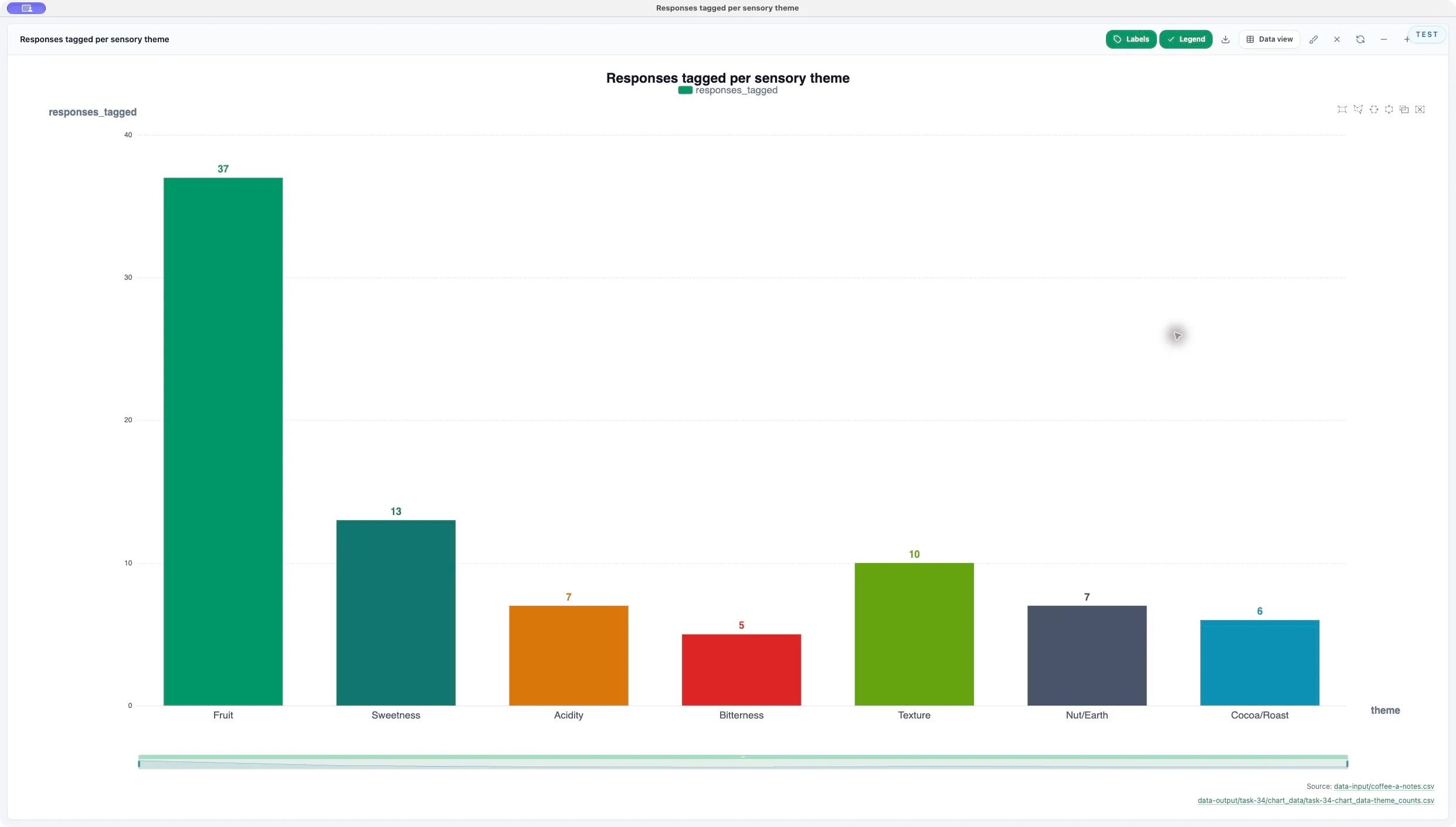
The DataForest chart viewer shows an earlier coding pass. Use the revised count CSV for the figures in the tasting brief.
To check the coding, we compared the first 30 responses with a separately prepared human reference, matching the set of labels on each ID regardless of order. 29 of those 30 label sets matched after the clarification. A-027 shows why it is worth reading the remaining row. The agent assigned Texture to “High tannins,” while the reviewer wanted a direct description of mouthfeel. A tasting team can settle that convention before applying it to a larger survey.
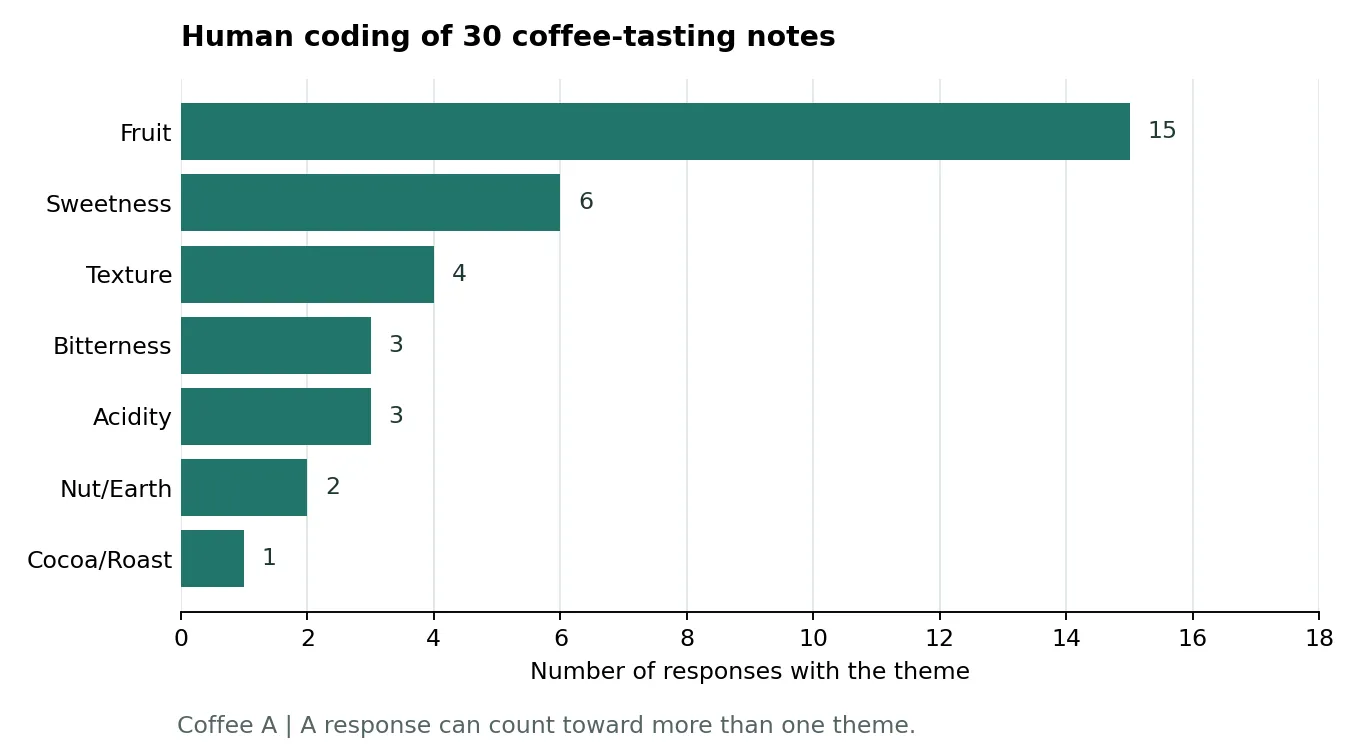
Human reference for the first 30 notes. Fruit appears on 15. This chart has a different denominator from the 60-note export.
For your own survey, open one multi-theme response and one flagged response before sharing the brief. Check that each quote occurs in the original note, count each ID once per theme, and retain the coding rule with the export. DataForest can find every affected row and recalculate the table when you refine a definition. Your review time can go into the words whose interpretation would actually change the finding.